Lost or stolen phone? How to block it with Sanchar Saathi, step by step
You can block a lost or stolen phone across all Indian networks using its IMEI number on the government's Sanchar Saathi portal or app, after filing a police complaint and getting a duplicate SIM.
Key points
- Sanchar Saathi, run by the Department of Telecommunications, can block a lost or stolen phone on all networks using its IMEI
- First file a police complaint (FIR) and get a duplicate SIM for your number, because OTPs go to that number
- Keep the IMEI numbers, purchase invoice and an ID proof such as Aadhaar ready
- After you submit, save the Request ID: you need it to check status or unblock the phone if it is found
- Never pay anyone who offers to 'trace' your phone for money; the service is free
Last checked: 26 November 2026. If your phone is lost or stolen, you can block it on every mobile network in India using its IMEI number, for free. The service is called Sanchar Saathi and is run by the Department of Telecommunications (DoT). Once blocked, the phone cannot be used with any Indian SIM, which makes it useless to a thief.
Here is exactly what you need and every step, on the website and the app.
Before you start, you need
- A police complaint (FIR) about the lost or stolen phone, from a police station or your state's online police portal. Note the complaint number.
- A duplicate SIM for your lost number, activated. OTPs are sent to this number.
- The phone's IMEI numbers. They are printed on the box and the purchase bill. (On a working phone, dial *#06# to see them; note them down today.)
- The purchase invoice (a photo or PDF).
- An ID proof such as Aadhaar, PAN or a driving licence.
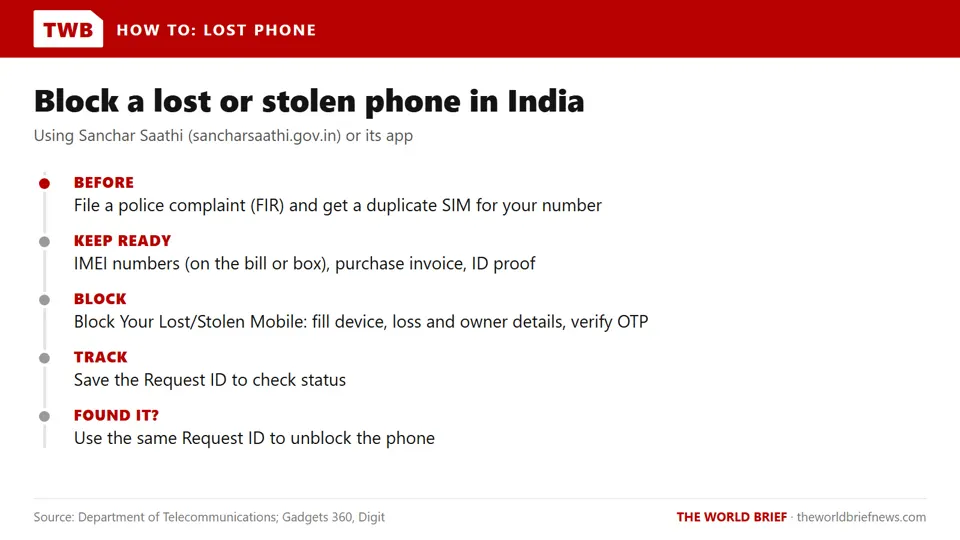
Step by step: block your phone on the website
- Go to sancharsaathi.gov.in.
- Under citizen services, choose Block Your Lost/Stolen Mobile Handset.
- Device details: enter your mobile number(s), IMEI number(s), brand, model and price, and upload the invoice.
- Loss details: enter where and when you lost the phone, the state, district and police station, and the complaint number. Upload the police complaint.
- Owner details: enter your name, address, ID type and number, and upload the ID proof.
- Enter the captcha, tap Get OTP, and enter the OTP sent to your duplicate SIM.
- Accept the declaration and submit. You will get an SMS with a Request ID. Save it.
Using the Sanchar Saathi app
The steps are the same in the Sanchar Saathi app (Android and iPhone): choose your language, register your number by SMS, tap Block Lost/Stolen Mobile, and fill in the same three forms, Gadgets 360 reported.
Found your phone? How to unblock it
Go back to Sanchar Saathi, choose the option to unblock a found mobile, and enter your Request ID and mobile number. After OTP verification, the phone works again on all networks. You can also check the status of your request with the same Request ID.
TWB analysis: do these 3 things today, before you lose a phone
- Save your IMEI: dial *#06# and save both numbers (dual-SIM phones have two) in an email or note.
- Keep the invoice: save a PDF or photo of your phone's bill in email or DigiLocker.
- Know your police portal: most states let you file a lost-phone complaint online in minutes.
These three steps can cut the time to block a stolen phone from days to under an hour.
Stay safe
- Sanchar Saathi is free. Ignore anyone who asks for money to "trace" or block your phone.
- Use only sancharsaathi.gov.in or the official app.
- Also change passwords for email, banking and UPI apps, and ask your bank to block UPI on the lost number if needed.
With inputs from Gadgets 360 and Digit.
More on The World Brief
- How to download e-Aadhaar online
- How to check if your PAN is active
- CERT-In warns of AI-driven cyberattacks