How to download e-Aadhaar online: 4 free ways, masked Aadhaar and the PDF password
You can download your Aadhaar as a PDF in minutes from UIDAI's myAadhaar portal using your Aadhaar number, Enrolment ID or Virtual ID, as long as your mobile number is linked to Aadhaar.

Key points
- e-Aadhaar is a digitally signed PDF that is as valid as the physical Aadhaar letter
- Download it free on myaadhaar.uidai.gov.in using your Aadhaar number, 14-digit Enrolment ID or 16-digit Virtual ID
- An OTP goes to your Aadhaar-linked mobile number, so that number must be active
- The PDF password is the first 4 letters of your name in capital letters plus your year of birth
- Choose 'masked Aadhaar' to hide the first 8 digits when you share it
Last checked: 26 November 2026. Lost your Aadhaar card, or need a copy quickly? You can download e-Aadhaar, an official, digitally signed PDF of your Aadhaar, for free in a few minutes. The Unique Identification Authority of India (UIDAI) says e-Aadhaar is as valid as the physical Aadhaar letter.
The one thing you must have is your Aadhaar-linked mobile number, because the download needs an OTP.
Quick answers
- Website: myaadhaar.uidai.gov.in (official UIDAI portal)
- Cost: free
- You need: your 12-digit Aadhaar number, 14-digit Enrolment ID or 16-digit Virtual ID, plus the linked mobile number
- PDF password: first 4 letters of your name in CAPITALS + year of birth (for example, RAHU1990 for Rahul Kumar born in 1990)
Method 1: with your Aadhaar number
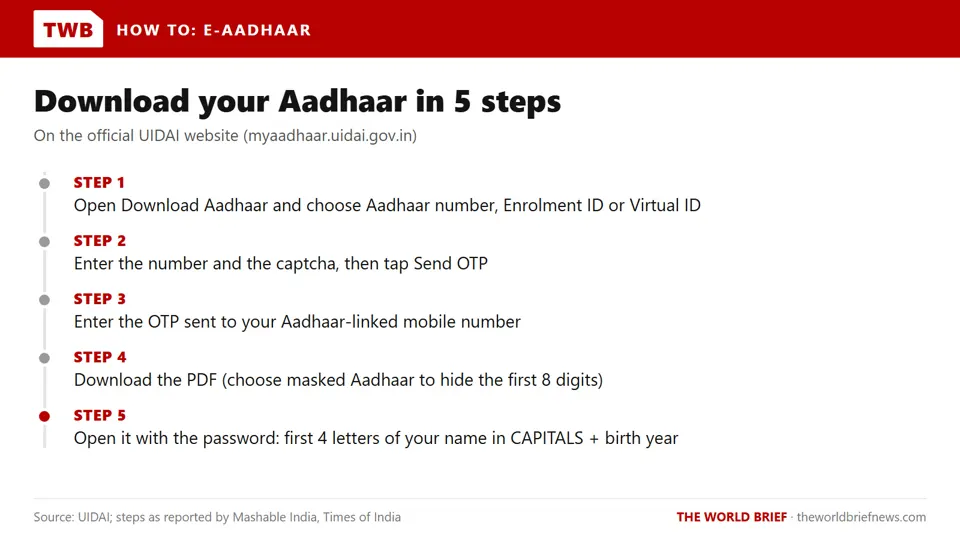
- Go to myaadhaar.uidai.gov.in and select Download Aadhaar.
- Choose Aadhaar Number and enter your 12-digit number.
- Type the captcha and click Send OTP.
- Enter the OTP sent to your linked mobile number.
- Tick masked Aadhaar if you want the first 8 digits hidden.
- Click Verify and Download. The PDF saves to your phone or computer.
Method 2: with your Enrolment ID (if you don't know the Aadhaar number)
Choose Enrolment ID (EID) on the Download Aadhaar page. Enter the 14-digit EID and the date and time printed on your enrolment slip, complete the captcha and OTP, and download, Mashable India reported.
Method 3: with your Virtual ID (VID)
A Virtual ID is a 16-digit number that stands in for your Aadhaar number. Choose Virtual ID, enter it, and follow the same OTP steps.
Method 4: DigiLocker or the Aadhaar app
If you use DigiLocker, link your Aadhaar once and it appears under Issued Documents. You can also view your Aadhaar in UIDAI's official Aadhaar app after signing in.
How to open the PDF
The file is password-protected. The password is the first four letters of your name in capital letters, followed by your year of birth. If your name has fewer than four letters, use the whole name. Example: name "Priya Sharma", born 1995, password PRIY1995.
TWB analysis: always share the masked version
A masked Aadhaar shows only the last 4 of the 12 digits, which hides two-thirds of your number (8 of 12 digits, our calculation). Most hotels, landlords and private services only need to confirm who you are, so a masked copy is enough. This lowers the risk of misuse if a photocopy or PDF leaks.
If the OTP doesn't arrive
- Your mobile number may not be linked to Aadhaar, or may be an old number.
- To link or update it, visit an Aadhaar Seva Kendra or enrolment centre. A mobile number update needs a visit with biometric verification.
- Wait a few minutes and try again; avoid repeated requests in a short time.
Stay safe
- Download only from uidai.gov.in, myaadhaar.uidai.gov.in, DigiLocker or the official Aadhaar app.
- Never share your Aadhaar OTP with anyone who calls you.
- You can lock your Aadhaar biometrics on the myAadhaar portal for extra safety.
With inputs from Mashable India and UIDAI.
More on The World Brief
- How to check if your PAN is active
- How to block a lost phone with Sanchar Saathi
- How to submit Jeevan Pramaan from home